Switching tables on OpenTable
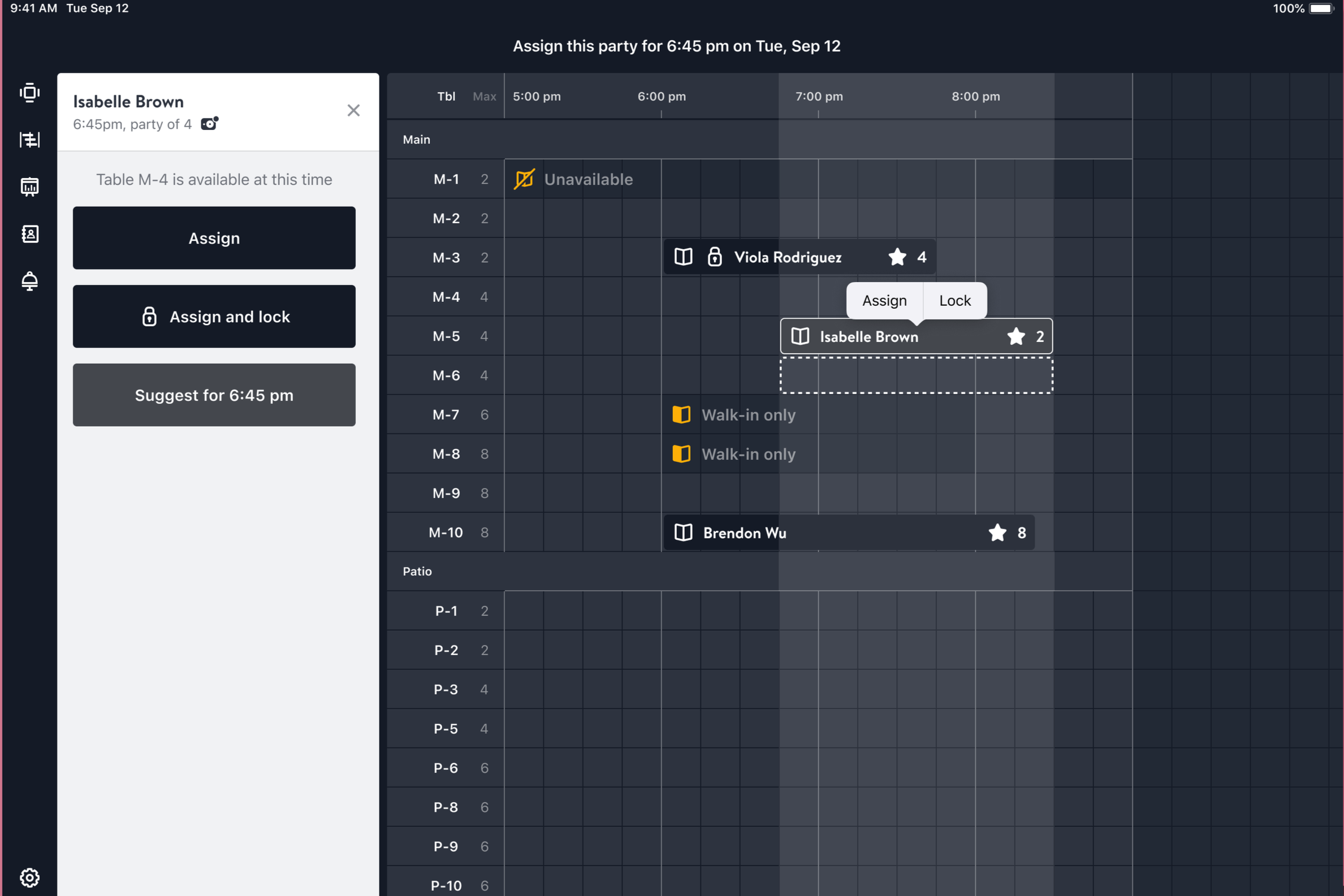
The Timeline is a planning tool used by the host team to organize a restaurant's reservations throughout the night. Each reservation is assigned to a table based on its party size and expected duration, while considering the reservations scheduled before and after it.
The goal is to create a seating plan with as little overlap as possible—allowing one reservation to finish and the table to be reset before the next party arrives. In practice, the anchoring hostess is essentially playing Tetris with the restaurant's reservations: fitting dozens of parties into a limited number of tables while accounting for timing, table size, and the pace of service.
Structured Precision, Every Step
Our team applies a systematic series of phases, ensuring each engagement advances logically from initial insight to final evaluation while maintaining full transparency.
Discovery
As I began anchoring, managing over a hundred reservations throughout a night could be intimidating. The key is to move quickly while remaining confident, calm, and patient. Guests will occasionally request a different table, requiring the hostess to find another table that can accommodate their party and adjust the seating plan accordingly.
When making these changes, I typically look for another suitable table on my iPad and move the reservation to its new location. However, changing one reservation can create overlaps with other reservations already assigned to that table, requiring additional adjustments.
This made me wonder: instead of moving reservations individually, could reservations associated with the same table be moved as a group? For example, if Tables 102, 105, and 109 have a sequence of reservations throughout the evening, a hostess could select the entire sequence and transfer it to another suitable table. The system could then preserve the existing reservation order while allowing the hostess to make one change instead of manually rearranging each reservation.
Strategy Design
From the previous instance, it would’ve be nice to select 102, 105, and 109 in one go and assign them to pastas, rather than doing it individually. As stated prior, the current interface OpenTable manages currently is intuitive and helpful, so I knew I wanted to keep it, just add a feature on top.
From experience, the pop-up to change a table’s status does cover the entire floor plan and withholds you from selecting other tables on the screen - which I did want to incorporate in my feature. I thought it would be best to implement a hold down feature that transitions to a different frame of the entire floor plan to select the tables at a specific course.

Analysis
Using the high-fidelity prototype on Figma, I have tested and used this instance on my peers and myself and we do find it helpful in the scenarios given. However, no professional research was concluded.
Optimization
How to do an ‘Update’
Individually assign each table to their respective course status.
-
![]()
Smart Warehouse Retrofit
-
![]()
Municipal Water Monitoring
-
![]()
Renewable Microgrid Design
-
![]()
Retail Demand Forecasting




new feature
new feature
new feature
new feature
new feature
new feature
Illuminating Expertise in Motion
We present dynamic visual case studies that validate our comprehensive solutions.
-
![]()
Smart Warehouse Retrofit
-
![]()
Municipal Water Monitoring
-
![]()
Renewable Microgrid Design
-
![]()
Retail Demand Forecasting